Screenshots
App details
- Version
- 0.8.2
- Size
- 23.52 KB
- Updated
- July 20, 2021
- Requires
- Windows Vista
- Language
- English | German | Spanish | French
- License
- Free
- Developer
- Visit Website
- Category
- Windows OS
SoftPas in:
This product is also available in the following languages:
About Close n forget
Download Close ’n Forget – Private Browsing, History Cleaner, Cookie Eraser for Firefox
Overview
Close ’n Forget is a lightweight, open‑source add‑on for Mozilla Firefox that gives you granular control over what browsing data stays on your computer. While most browsers offer a one‑click “Private Browsing” mode, Close ’n Forget lets you decide, on a per‑tab or per‑domain basis, whether to erase history, cookies, or both the moment you close a page. The extension integrates directly into Firefox’s right‑click context menu, allowing you to “Close and Forget” a tab with a single click. This approach is especially handy for users who want to keep their regular browsing session intact but need to make sure that a specific site leaves no trace. Whether you’re researching sensitive topics, logging into a shared computer, or simply want to keep your digital footprint minimal, Close ’n Forget offers a discreet, fast, and configurable way to do so without the overhead of switching to a full private‑window mode every time.
Key Features
- Domain‑wide history removal: Choose to delete every page you visited on the current domain, ensuring the entire site disappears from Firefox’s history.
- Single‑page erase: Remove only the history entry for the active page, perfect for one‑off visits.
- Tab‑specific cleanup: When you close a tab, you can automatically purge the history of every page that was opened in that tab.
- Cookie management: Right‑click to delete cookies from the current page, the whole domain, or all cookies stored by Firefox.
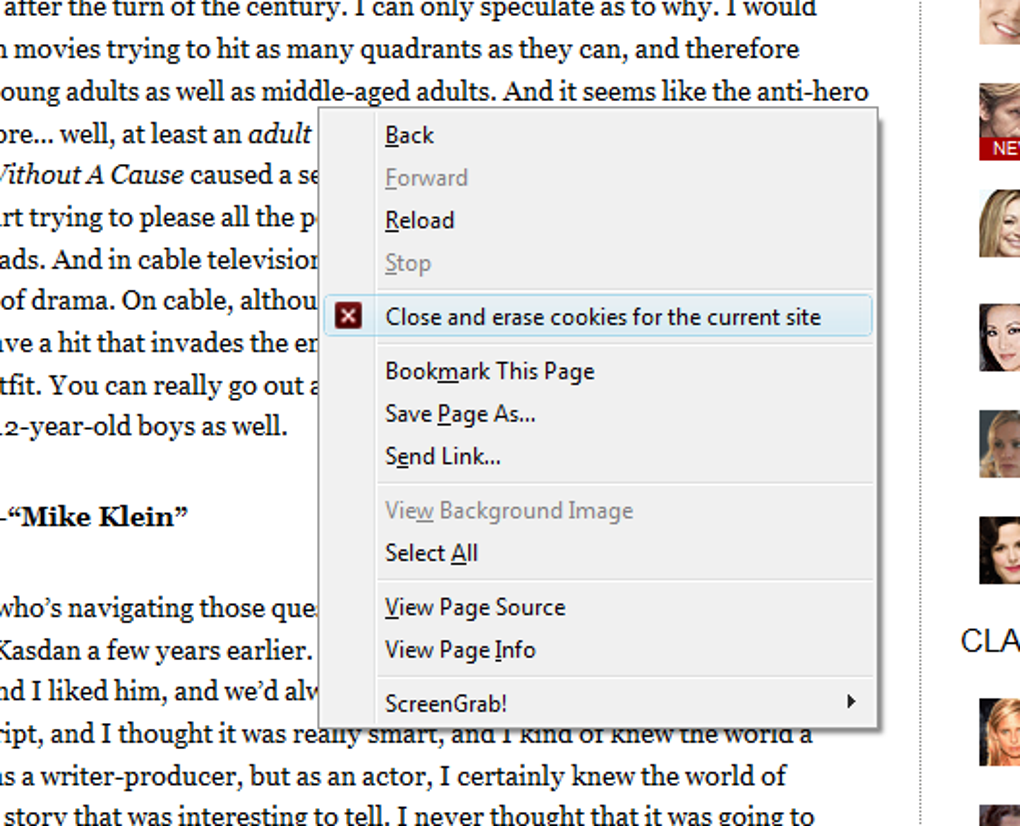
- Customizable context‑menu actions: Add “Close and Forget” or “Close and Keep” options to your right‑click menu for instant control.
- Lightweight and fast: The add‑on runs silently in the background, consuming negligible CPU or memory.
- Automatic updates: Receives regular security patches and feature improvements through Firefox’s add‑on ecosystem.
- Open‑source transparency: Code is publicly available on GitHub, allowing the community to audit and contribute.
Installation, Usage & Compatibility
Step‑by‑step Installation
- Open Firefox and navigate to the Close ’n Forget page on Mozilla Add‑Ons.
- Click the Add to Firefox button.
- A permission dialog appears; review the requested access (history, cookies, tabs) and click Add.
- After installation, you’ll see a new icon in the toolbar and additional options in the right‑click context menu.
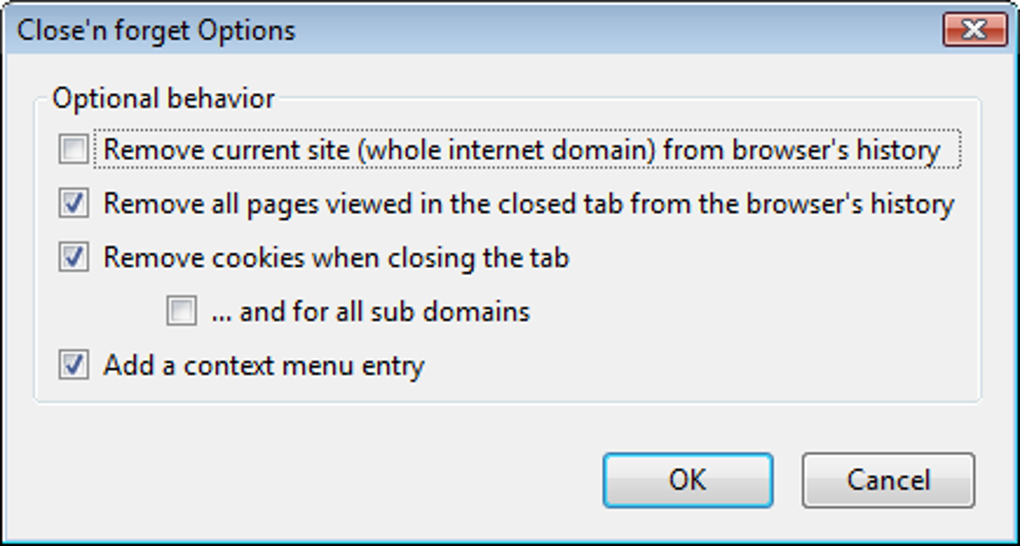
- Open the add‑on’s Options page (via the toolbar icon or Add‑Ons Manager) to fine‑tune default behavior – choose whether history, cookies, or both are removed automatically when a tab is closed.
How to Use Close ’n Forget Effectively
Once installed, the add‑on works seamlessly with your regular browsing workflow. To delete a page’s history, right‑click the tab and select “Close and Forget.” If you prefer to keep the page but erase its cookies, choose “Delete Cookies” from the same menu. The Options panel also lets you set global defaults – for example, always delete cookies for any site you close, while preserving history for trusted domains. Advanced users can create custom rules using Firefox’s about:config page, though the built‑in UI covers 95 % of typical use cases.
Operating System Compatibility
Close ’n Forget works on any platform that supports the latest version of Mozilla Firefox, including Windows 10/11, macOS 10.15 and newer, Linux distributions (Ubuntu, Fedora, Debian, etc.), and even Firefox for Android (via the same add‑on store). Because it is a browser extension rather than a standalone program, there are no separate installers for each OS – the same add‑on package runs across all supported systems.
Updates & Security
The extension follows Firefox’s automatic update mechanism. When a new version is published, Firefox will download and install it in the background, ensuring you always have the latest privacy improvements and bug fixes. Since the add‑on manipulates browsing history and cookies, it is signed by Mozilla and regularly reviewed for security compliance.
Pros, Cons & Expert Review
Pros
- Granular control over history and cookies without leaving private‑browsing mode.
- Instant right‑click actions save time compared to navigating settings menus.
- Lightweight footprint; no noticeable performance impact.
- Open‑source transparency builds trust.
- Works across all major operating systems that support Firefox.
Cons
- Only available for Firefox; no Chrome or Edge version yet.
- Advanced rule‑setting requires familiarity with
about:config. - Some users may find the default context‑menu entries redundant if they already use Private Browsing.
Overall Rating: 4.5 out of 5 stars
Close ’n Forget fills a niche that many Firefox users have been craving – the ability to erase traces on a per‑site basis without committing to a full private session. The UI is intuitive, the right‑click integration feels natural, and the performance impact is negligible. While the lack of cross‑browser support limits its audience, for Firefox power users the extension is a must‑have privacy tool. The few minor drawbacks (lack of Chrome version, occasional need for advanced configuration) are outweighed by the flexibility and speed it provides.
FAQ & Conclusion
Can Close ’n Forget delete browsing data from other browsers?
No. The extension is built specifically for Firefox and interacts only with Firefox’s internal history and cookie stores. For other browsers you’ll need comparable add‑ons or built‑in private‑browsing features.
Is the add‑on safe to use on public computers?
Yes. Because it removes history and cookies the moment you close a tab, no trace of your activity remains on the machine. However, always log out of any accounts before leaving the computer.
Does Close ’n Forget work with Firefox’s Sync feature?
When you use Firefox Sync, history and cookies are synchronized across devices. Deleting data with Close ’n Forget removes it locally and, after the next sync cycle, the deletion propagates to your other devices.
Can I customize which domains are automatically forgotten?
Yes. In the Options panel you can add domain‑specific rules to always erase history or cookies when you close a tab from that site.
Is there a paid version with extra features?
Close ’n Forget is completely free and open‑source. All core features are available at no cost, and the developer relies on community donations rather than a paid tier.
Final Thoughts and Call to Action
For anyone who values privacy but doesn’t want to juggle multiple private windows, Close ’n Forget offers a smart, unobtrusive solution that integrates directly into your daily browsing flow. Its domain‑level control, instant right‑click actions, and low resource usage make it stand out among Firefox extensions. Install it today, configure your preferred defaults, and experience a smoother, more secure way to browse the web without leaving unwanted traces.
Download Close ’n Forget now and take immediate control of your browsing history and cookies.
Guides & Tutorials
How to install Close n forget
- Click the Download button above.
- Once redirected, accept the terms and click Install.
- Wait for the Close n forget download to finish on your device.
How to use Close n forget
This software is primarily used for its core features described above. Open the app after installation to explore its capabilities.
User Reviews
No reviews yet. Be the first to share your experience.
You may also like
more
Llama 2
Free-to-use large language model As the new addition to Meta’s arsenal of langua...

NotebookLM
Revolutionizing the note-taking and idea-generation process NotebookLM is an exp...

Github co pilot
AI-inspired software development and coding platform GitHub Copilot is a browser...

Google Gemma
Google’s lightweight AI models Introducing Google Gemma , a family of cutting-ed...

AI Image Enlarger
A free app for Windows, by ai-image-larger. AI Image Enlarger is a free software...

DALL E
AI-driven text-to-image transformation engine DALL·E is a free graphic and desig...